How to Upgrade
This page contains general upgrade instructions for all Console versions. If you are upgrading from v14 to v15, jump directly to the Console v15 upgrade section below, as the Helm chart and authentication model changed significantly in v15.
In order to upgrade Mia-Platform Console, all you need to do is to update the mia-console Chart version dependency in your Chart.yaml file.
When upgrading Mia-Platform Console to a new major release, always remember that updates must be performed one major at a time. Therefore, in order to upgrade from v12 to v14 you must first upgrade to the latest v13 version.
To find out how to upgrade your installation to the latest version of v13.
apiVersion: v2
name: console
version: "0.0.0"
kubeVersion: ">= 1.32.0"
description: Self Hosted Console Installation Chart
type: application
dependencies:
  - name: mia-console
    version: "X.Y.Z"
    repository: "https://nexus.mia-platform.eu/repository/helm-internal/"
When upgrading also make sure to check if any new configuration option is available or if something has been removed.
The Chart version follows semver policy so any breaking change with the Chart will always be followed by a Major release. Minor releases may include new configuration options while as a general rule of thumb, patches never holds new configuration options but only internal updates and fixes.
Console v15 - version upgrades
From 15.1.0 to 15.1.0-4 (Mia-Platform v15.1.0 to v15.1.1)
No manual action required: install the new chart version.
From 15.0.15-10 to 15.1.0 (Mia-Platform v15.0.2 to v15.1.0)
-
If you configured Mia Assistant embeddings, remove
configurations.assistant.embeddings.apiKey: the chart no longer reads it. The embeddings model now uses the API key of the LLM provider of the same type: setconfigurations.assistant.keys.azureLlmApiKeywhenembeddings.typeisazure, orconfigurations.assistant.keys.openaiLlmApiKeywhen it isopenai.configurations:assistant:keys:+ azureLlmApiKey: "azure-apiKey"embeddings:type: "azure"- apiKey: "embeddings-apiKey" -
If you configured embeddings, set
configurations.assistant.embeddings.typeexplicitly toopenaiorazure: without it, the chart passes no API key to the embeddings model.
Also note:
configurations.assistant.keys.githubis no longer used and can be removed.- Mia Assistant is now deployed as soon as
configurations.assistant.enabledistrue, even withoutllmsorembeddings.
From 15.0.15-3 to 15.0.15-10 (Mia-Platform v15.0.1 to v15.0.2)
- If you set
configurations.additionalCABundle, make sure it also contains the public certificate authorities your services need. The bundle is now also mounted in theapi-gateway, where it replaces the system trust store, and theapi-gatewayuses it to validate the TLS connection to Keycloak.
Also note:
- The new optional
configurations.trustedOriginslist adds origins to the trusted origins of the authentication session, in addition toconsoleUrlandcmsUrl.
Upgrade from last Console v14 to v15.0.0
Console v15 introduces a breaking change in the authentication architecture: the OAuth2-based provider configuration is replaced by a direct integration with Keycloak. The authenticationService is replaced by the new authtool-bff service.
Make sure you have a running Keycloak instance configured before upgrading. Refer to the Authentication Provider documentation for details.
1. Replace authProviders with configurations.keycloak
Remove the entire configurations.authProviders array and replace it with the new configurations.keycloak block:
 configurations:
-  authProviders:
-    - name: "<PROVIDER_NAME>"
-      type: "okta"          # or gitlab, github, microsoft, ...
-      baseUrl: "..."
-      clientId: "..."
-      clientSecret: "..."
-      # ... other provider fields
+  keycloak:
+    protocol: "https"
+    host: "<KEYCLOAK_HOST>"
+    realm: "<KEYCLOAK_REALM>"
+    extensibilityRealm: "<KEYCLOAK_EXTENSIBILITY_REALM>"
2. Remove userAccountAuthProvider
The configurations.userAccountAuthProvider block is no longer used. Remove it entirely:
 configurations:
-  userAccountAuthProvider:
-    tokenPassphrase: "..."
-    jwtTokenPrivateKeyBase64: "..."
-    jwtTokenPrivateKeyPassword: "..."
-    jwtTokenPrivateKeyKid: "..."
3. Replace authenticationService with authtoolBff
The authenticationService is replaced by authtoolBff. Rename any resource overrides and add the required cryptographic keys:
-authenticationService:
-  deploy:
-    resources: { ... }
+authtoolBff:
+  keys:
+    privateKey: "<BASE64_PRIVATE_KEY>"
+    cookieSecret: "<COOKIE_SECRET>"
+    redisTokenEncKey: "<REDIS_TOKEN_ENC_KEY>"
+  deploy:
+    resources: { ... }
Generate the new secrets with the following commands:
# RSA private key for authtool-bff (base64 encoded, no passphrase)
ssh-keygen -t rsa -b 4096 -m PEM -f private.key -N "" > /dev/null
authtoolBffPrivateKey=$(base64 < private.key)
rm private.key private.key.pub

cookieSecret=$(openssl rand -hex 64)
redisTokenEncKey=$(openssl rand -hex 32)
4. Remove deprecated service configurations
The following top-level service keys are no longer present in the chart and must be removed from your values.yaml:
| Removed key | Notes |
|---|---|
apiPortal | API Portal has been removed |
loginSite | Login site is now managed by Keycloak |
rateLimitEnvoy and notificationProvider are still present in the chart and do not need to be removed.
5. Update configurations.redis.hosts format
The configurations.redis.hosts field changed from a single connection string to an array of objects with ip and port properties:
 configurations:
   redis:
-    hosts: "redis-host:6379"
+    hosts:
+      - ip: "redis-host"
+        port: 6379
Console v14 - version upgrades
Upgrade from versions prior to v14.5.2 (or later)
When upgrading to Console versions >= v14.5.2, if the Deploy Service has a custom value applied for the MIA_K8S_SERVICE_PORT env variable, make sure to replace this variable with the new variable whose name is K8S_SERVICE_PORT.
Upgrade from v14.0.3 to v14.1.0
With Console v14.1.0, the Mia-Assistant evolves and now supports multiple LLM models!
For this reason few changes are necessary to configure it properly.
Multiple LLM configurations
First of all, configurations.assistant.llm is now configurations.assistant.llms (note the final s) and is now accepting a list of llm configurations.
Update the already configured LLM to be an item in this list
e.g., (before)
configurations:
  # ...
  assistant:
    llm:
      type: "azure"
      apiVersion: "..."
      # ...
e.g., (after)
configurations:
  # ...
  assistant:
    llms: # note the final 's'
      - type: "azure" # note the '-'
        apiVersion: "..." # note the increased indentation
        # ...
LLM DisplayName
configurations.assistant.llm items now require a displayName field to be set. This value is shown to the user when selecting the related model on the Mia-Assistant chat panel.
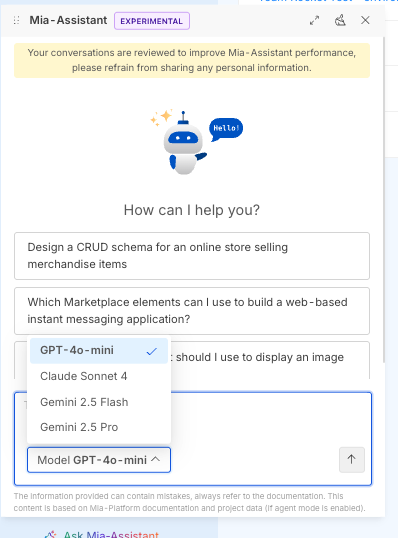
Make sure to include this field in all the configured models.
configurations:
  # ...
  assistant:
    llms:
      - type: "azure"
        apiVersion: "..."
+       displayName: "GPT-4o Mini"
        # ...
Assistant Keys
configuration.assistant.keys.embeddingsfield has been moved intoconfiguration.assistant.embeddings.apiKey
configurations:
  # ...
  assistant:
    keys:
-     embeddings: "embeddings-apiKey"
    llms:
      # ...
    embeddings:
      type: "azure"
+     apiKey: "embeddings-apiKey"
      # ...
configuration.assistant.keys.llmfield is now split to support credentials for multiple providers:
configuration.assistant.keys.azureLlmApiKeyconfiguration.assistant.keys.openaiLlmApiKeyconfiguration.assistant.keys.vertexAICredentials
Ensure to move the apiKey used before into the correct field
Follow the Assistant documentation to learn more about how to configure it.
Specific upgrade for LLM/Embeddings using vertex models
If you currently configured Mia-Assistant to use models from VertexAI you should now specify the configuration.assistant.keys.vertexAICredentials field.
This field automatically creates a Secret on k8s with specified credentials and mounts it in the mia-assistant container.
Upgrade from last Console v13 to v14.0.0
No further changes are needed for the upgrade. Enjoy ;)