Campaigns
A Campaign groups one or more Rules that must be satisfied by a set of catalog items within a defined time window. Campaigns turn a snapshot evaluation into a time-bounded compliance program with a clear deadline.
A campaign declares:
startTime: when the campaign period begins.endTime: the deadline by which all rules should be satisfied.rules[]: one or more Rules, either copied from a Scorecard when the campaign is built from one (once a target level is selected, that level's rules and every level below it are duplicated onto the campaign) or written directly on the campaign when it is built from scratch. Once on the campaign, the rules are independent of the source scorecard: later changes to the scorecard do not propagate.scope: a target set of items defined as a view reference or a raw query (see Query Language).reportFrequency(optional):Daily,Weekly, orMonthly— see Evaluation for how it drives scheduled re-evaluation.
The dates define the campaign's time window and also drive automatic evaluations — see Evaluation below.
Relationship with Scorecards
In practice, a campaign is most often built from a Scorecard: you pick an existing scorecard and select a target level — the rules from that level downward are copied onto the campaign. The campaign keeps a link to the scorecard it originated from for audit and navigation, but the copied rules evolve independently from that point on.
It is also possible to create a campaign from scratch by defining rules directly, without referencing a scorecard.
The mental model:
- A scorecard is the standing compliance ladder for a scope: it answers "where do we sit today?" continuously.
- A campaign is the time-bounded push to move that scope up the ladder by a deadline.
Evaluation
Every configured rule is evaluated against the target item set (the same flow used by a standalone rule run, see Evaluation Criteria). Results are stored on the Campaign item and exposed both via the Catalog API and in the Catalog App.
A campaign is re-evaluated through three independent mechanisms:
- On demand: an operator triggers a run from the Catalog App.
- On a schedule: evaluations are automatically triggered at
startTime, atendTime, and — ifreportFrequencyis set — at everyDaily/Weekly/Monthlyinterval in between. - On item change: whenever any item in the catalog is created or updated, the catalog automatically checks whether that item belongs to the scope of any campaign and, if so, re-evaluates those campaigns.
Notifications
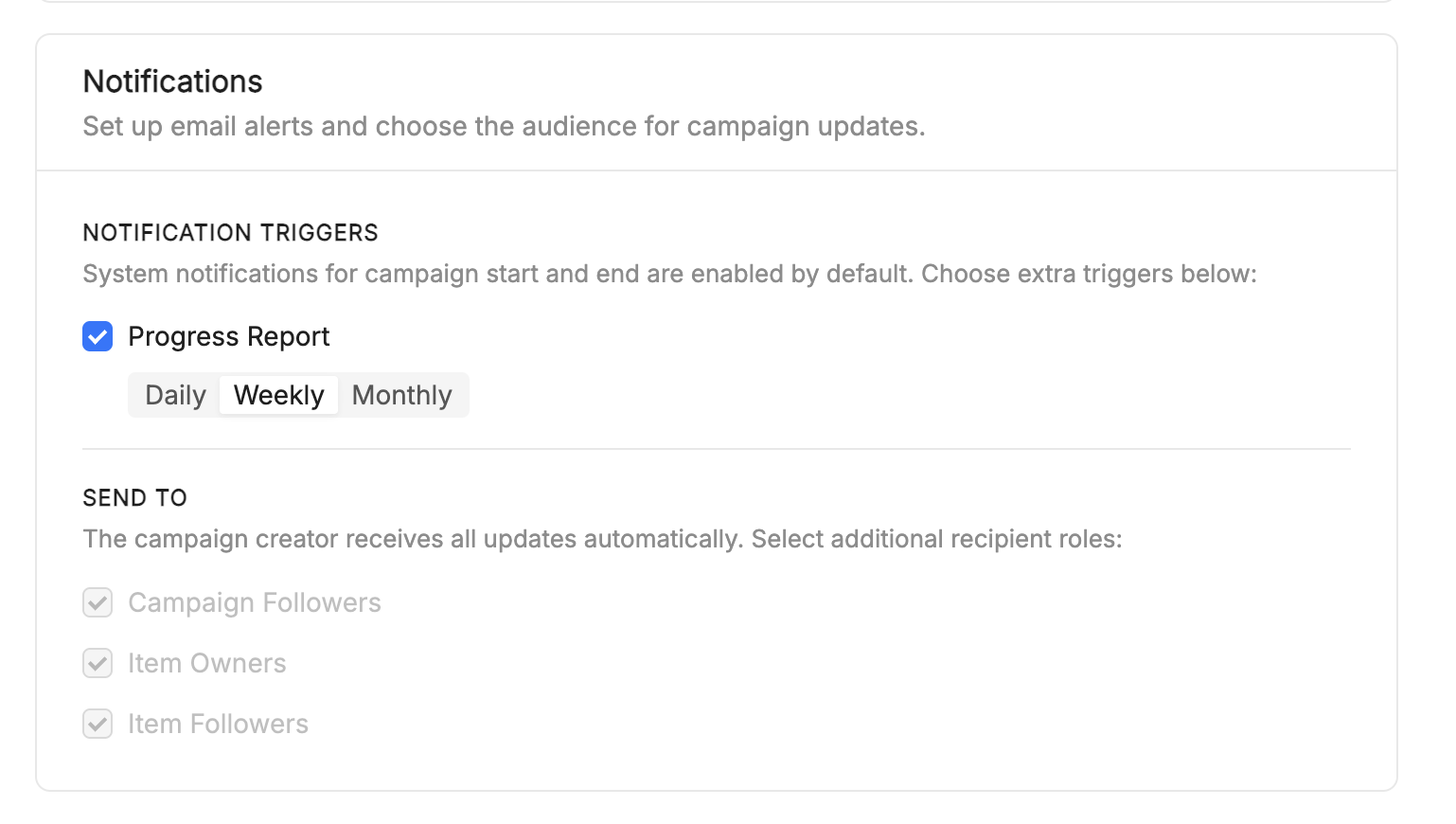
Campaign notifications let users define a notification policy for a campaign, controlling which events raise a notification, who receives it, and how often periodic reports are sent.
Compliance campaigns run asynchronously over days or weeks, evaluating catalog items against a set of rules. Rather than requiring stakeholders to poll campaign status, campaign notifications attach an automated, configurable policy to each campaign that the backend evaluates during execution.
Core concepts
- Campaign — a compliance initiative that evaluates catalog items against a set of rules within a time window (
startTime–endTime). - Campaign notifications — the notification policy defining events, recipients, and report frequency.
- Notification event — a campaign lifecycle event that can trigger a notification:
start,end,reminder,periodicReport. - Report frequency — the cadence of periodic progress reports:
daily,weekly,monthly. - Recipient group — a set of users eligible to receive notifications:
campaignOwners,campaignFollowers,itemOwners,itemFollowers. - Follower — a user linked to a campaign through a
Relationshipitem of typefollow.mia-platform.eu. - Relationship — a generic Catalog entity (
kind: Relationship) connecting two resources via atypeRef; here it links users to campaigns. - Catalog Engine — the backend service exposing the generic Item CRUD API and compliance-specific endpoints.
What it does
- Notification configuration: when creating a campaign, a user can also configure its notifications: which events trigger them, who receives them, and how often periodic reports are sent.
Reminder before campaign end
In addition to the start and end lifecycle events, a campaign's notification policy now supports a configurable reminder: a notification sent a set number of days before endTime, to prompt owners and followers to close out any pending items before the deadline.
When configuring notifications for a campaign, users can set:
- Reminder offset — the number of days before
endTimeat which the reminder is sent. - Recipient groups for the reminder event, chosen among
campaignOwners,campaignFollowers,itemOwners,itemFollowers(see Core concepts). Item owners and followers are reached through the email associated with the item'sowner/followerfields — items themselves are never notification recipients.
How configuration works
- A user creates a campaign; default notification settings are initialized.
- The user customizes events, recipient groups, and report frequency.
- The policy is persisted as part of the
Campaignresource. - The Campaign Details page displays the persisted configuration.
- Existing notification settings can be edited after the campaign has been created, from the Campaign Details page.
How subscriptions work
- A user follows a campaign.
- A
Relationshipresource of typefollow.mia-platform.euis created between the user and the campaign. - The user becomes part of the
campaignFollowersrecipient group.
How delivery works
- The backend executes the campaign evaluation.
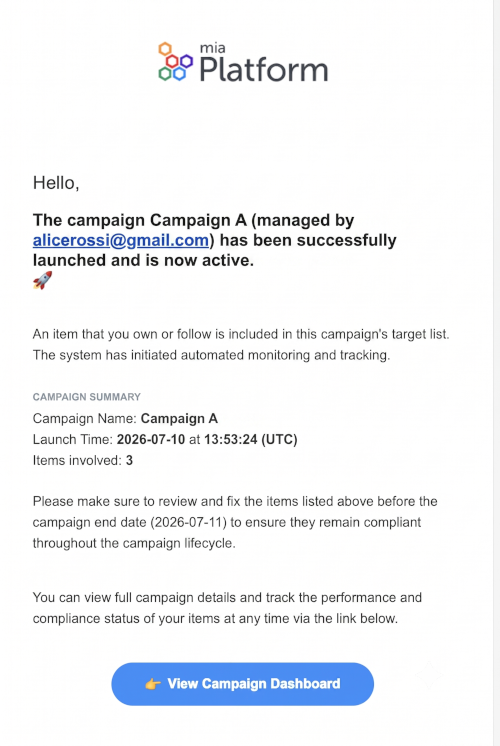
- Lifecycle events (
start,end,scheduled,periodicReport) are generated. - The backend evaluates the notification policy and resolves recipient groups.
- Notifications are delivered through the supported channel, currently email.
Design choices
- Notifications live inside the campaign resource. Embedding the policy in
Campaign.spec.notificationskeeps configuration and notification behavior versioned and persisted together, without a dedicated notification store. - The frontend only configures, it doesn't deliver. Scheduling, event generation, recipient resolution, and message delivery stay backend responsibilities, keeping presentation and execution separate.
- Followers reuse the generic relationship model. Modeling followers as
Relationshipitems — instead of a campaign-specific structure — lets the same mechanism apply across resource types. - Configuration is decoupled from transport. The data model doesn't depend on the delivery mechanism, so new channels (in-app, push, messaging platforms) can be added without changing the Campaign domain model.
Current limitation
At the time of writing, only spec.reportFrequency is guaranteed to be persisted consistently by the backend. The remaining notification configuration fields are part of the intended data model but may not yet be fully supported by the persistence layer.
Item types involved
Campaigns interact with a small number of catalog item types:
- Rules: deterministic conditions evaluated against a context of items; a campaign's rules are either copied from a Scorecard or defined directly on the campaign.
- Rule-runs: evaluations of a rule against a context of items at a given moment.
- Scorecards: see Scorecards for the related, complementary concept.
See also
- Evaluation Criteria: how individual rules are evaluated.
- Scorecards: how to express and roll up overall compliance posture.
- Catalog App: where to monitor campaign progress in the UI.