AI Foundry Overview
AI Foundry is a web-based management and orchestration platform for building, managing, and validating AI-powered workflows. It provides a unified interface to compose, test, run, and monitor agentic applications without writing code directly, and routes all model traffic through a governed AI Gateway. It targets enterprises that need to govern and reuse AI assets across teams.
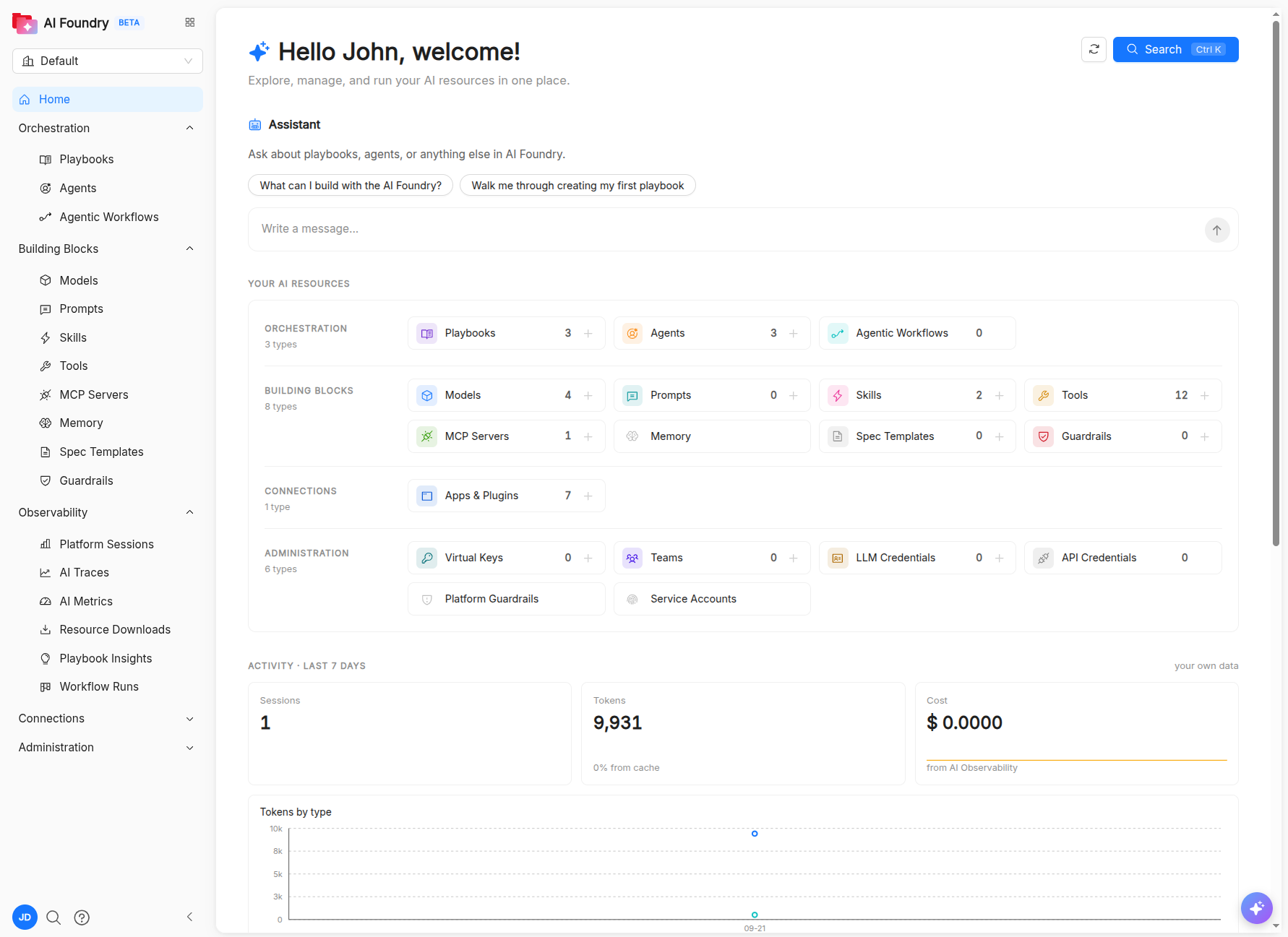
Key Concepts
AI Foundry organizes AI assets as catalog resources. Each resource shares common metadata (name, title, description, tags, labels, and timestamps), is scoped to your tenant, and can be versioned, searched, and reused across teams.
- Owner. The owner of a resource is the principal ID used by the Catalog RBAC, so who can manage a resource follows the same rules as the rest of the Catalog.
- Clone. The main resources, such as playbooks, agents, and skills, can be cloned from their detail page. A clone is a new, independent resource that you own and can edit freely.
- Managed resources. Resources shipped with the installation (seeded) are shared with every tenant and are locked: they cannot be edited or deleted, only cloned. This includes the system playbooks and agents that AI Foundry uses internally (
session-namer,memory-extractor,followup-suggester,compaction-summarizer,feedback-summarizer, andinsights), which are provisioned like any other resource.
The resources fall into three groups: the building blocks that define what an agent knows and can do, the orchestration resources that combine them into executable flows, and the gateway resources that govern how models are called.
Building blocks
Building blocks are the reusable assets that agents are made of. You manage them from the Building Blocks section of the sidebar, where each type has a list page, a guided creation form, and a JSON editor for the underlying spec.
- Model: an LLM configuration, routed through the AI Gateway, that wraps a provider model and its runtime parameters. Provider credentials are stored encrypted on the AI Gateway and are never shown again after they are saved; a single LLM Credential can be shared by several models. For models that support it, you can also set the reasoning effort.
- Prompt: a reusable prompt template that agents and playbooks can reference, also exposed as a slash command. Prompts are authored in Markdown with a live preview pane and can be tagged for discoverability.
- Skill: a reusable, higher-level capability that packages instructions, templates, scripts, and assets, and can be attached to agents or playbooks.
- Tool: an executable function or integration that an agent can invoke. The tool browser lists all tools available in the system, grouped by category, including those discovered from MCP servers. Runtime tools such as
web_searchare provided by the Mia AI Runtime and are enabled explicitly on each agent. - MCP Server: an external Model Context Protocol server that exposes tools, prompts, and resources to agents. Once registered, its tools are included in the available tools list.
- Spec Template: a structured or free-form specification document that playbooks inject into Spec-Driven Development phases.
- App: an application or plugin (for example, an IDE assistant) that built-in tools belong to.
- Memory and Guardrail: described in the sections below.
Memory
Memory gives agents long-term recall across conversations. Unlike the other building blocks, memory entries are not catalog items: they belong to a person, not to an agent or a session, and are stored by a dedicated memory service scoped to your tenant.
- Agents can recall relevant entries during a conversation, and can store new facts explicitly (when you ask them to remember something) or automatically, by extracting durable facts from the conversation every few turns.
- Each entry has a kind (
user,feedback,project, orreference), a short description, and a Markdown body that can link to other entries. - Entries are private by default. The owner can share an individual entry with colleagues, with read-only or write access; shared entries always show who wrote them and when.
- Sensitive content is redacted before an entry is stored.
Memory is enabled per installation. When it is enabled, every agent can use it.
From the Memory page you can review, search, and edit what agents remember about you: search your memory the same way an agent does, add entries by hand, share individual entries, download your memory as a MEMORY.md file for your editor, or erase all of your entries at once. Memory is also exposed through an MCP endpoint, so coding assistants such as Claude Code and GitHub Copilot can read and write the same entries.
Guardrails
Guardrails are tenant resources attached explicitly to agents in order to enforce safety and compliance policies on the traffic between agents and models. Each guardrail is a Python function that receives the request or response and returns one of three decisions: allow, block (with a reason shown to the user), or modify (for example, to redact personal data).
A guardrail runs at one or more points of the call, selected by its mode: before the model call, after it, during streaming, before or during an MCP tool call, or in logging-only mode. Built-in templates cover common cases such as blocking social security numbers, redacting email addresses, detecting SQL injection, validating JSON responses, and checking URLs.
You can create guardrails from a template or from scratch in the built-in Python editor, choose their modes, and enable or disable them. You attach a guardrail from the agent that it protects, through the agent's Guardrails field.
Orchestration
| Resource | Purpose |
|---|---|
| Agent | An AI entity backed by a model, with system instructions, attached tools, skills, and guardrails. |
| Playbook | A conversational multi-agent flow: agents, prompts, skills, and spec templates connected in a directed graph with sequential, parallel, and loop nodes. |
| Agentic Workflow | A durable, triggerable process that chains playbook calls with HTTP requests, Git operations, commands, conditions, delays, and human approvals. |
These three levels build on each other:
- An agent answers a single request, using its model, tools, and skills.
- A playbook orchestrates several agents inside a conversation: a root agent can hand off to sub-agents, and orchestration nodes run agents in sequence, in parallel, or in a loop.
- An agentic workflow orchestrates work outside a conversation. It runs deterministically on a durable workflow engine, can be started by hand, on a schedule, or by a webhook, survives restarts, and reaches agents through playbook steps.
Gateway resources
Administrators manage a set of resources that govern access to models through the AI Gateway: LLM Credentials (provider keys shared by several models), Virtual Keys (scoped, budgeted keys for clients outside AI Foundry), Teams (groups with shared budgets and model access), and API Credentials (secrets used by agentic workflow HTTP steps). See Administration and security.
Features
Keyboard shortcut
In every modal and drawer, except deletion confirmations, press ⌘+Enter (macOS) or Ctrl+Enter (Windows and Linux) to confirm or save without reaching for the button.
AI Playground
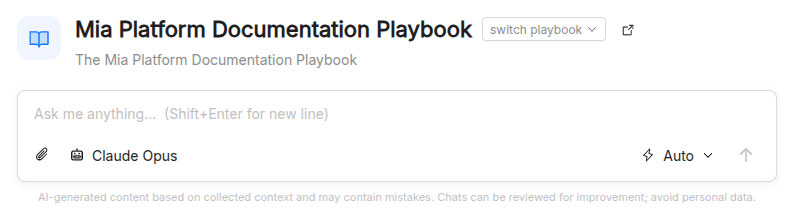
The AI Playground provides a live chat interface for testing playbooks in real time. Select a playbook, configure per-agent model overrides, and chat with the configured agent graph. The playground streams responses, visualizes tool calls, "thinking" steps, and hand-offs between agents inline, and lets you enable or disable individual tools and skills on the fly. It also supports slash-prompt auto-completion from the prompts associated with the selected playbook, file attachments, session history, and export of the conversation to PDF or Markdown.
Orchestration
The Orchestration section groups the resources that turn building blocks into running AI applications.
Agents
Create and configure agents by selecting a model, writing system instructions in Markdown, and attaching tools, skills, and guardrails. Tools are shown grouped by category in the picker, including tools sourced from registered MCP servers. Agents can be created through a guided form or by editing the underlying JSON spec directly.
Playbooks
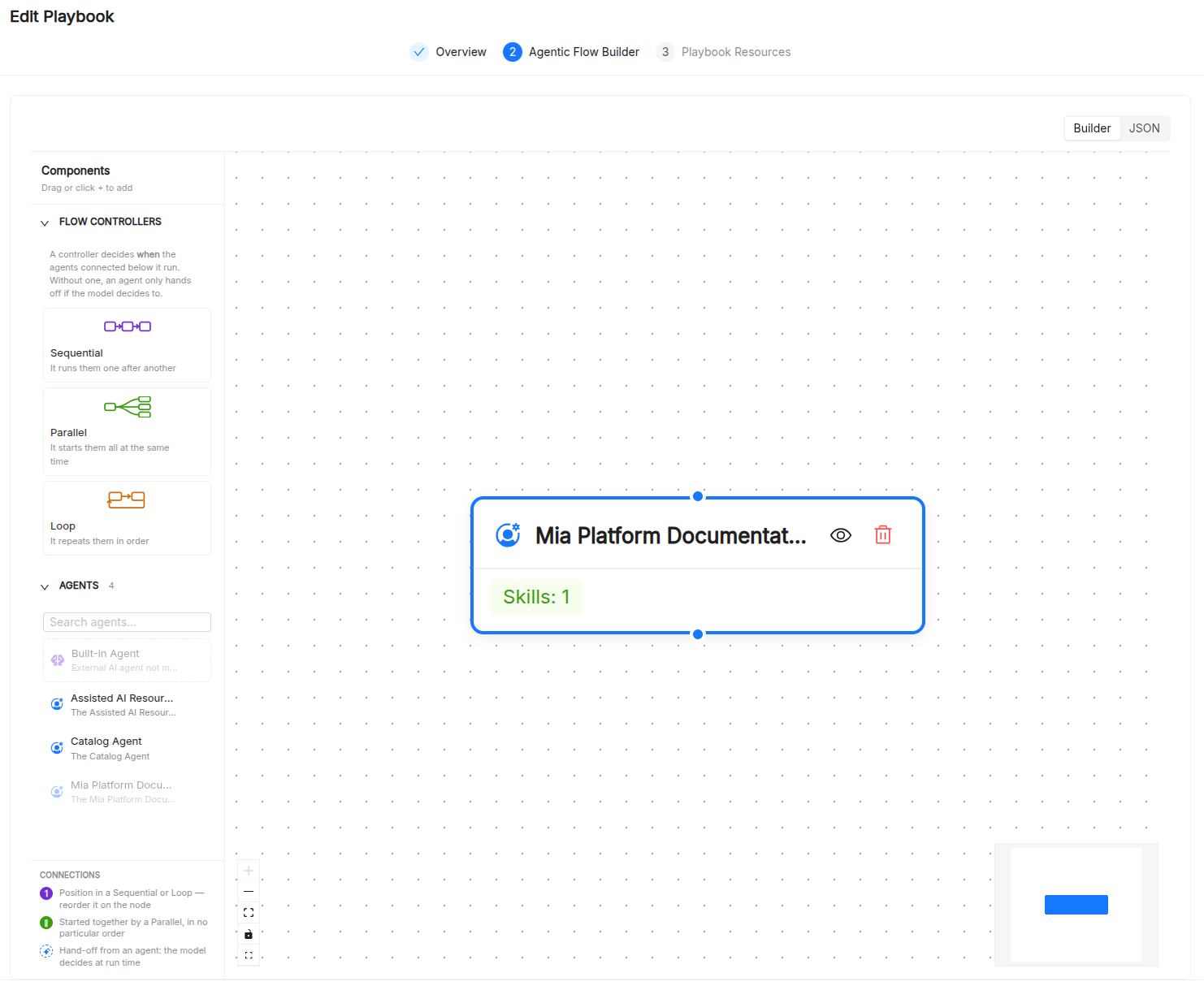
The Playbook Builder is a three-step wizard for designing multi-agent flows:
- Overview: set the playbook's name, title, and description, and optionally enable and configure its Mia Flow integration (show-on-home toggle, launch mode).
- Agent Graph: a drag-and-drop canvas where agent nodes are connected with edges; each edge makes the target a sub-agent the source can hand off to. In addition to regular and built-in agent nodes, you can add flow controllers for sequential, parallel, and loop (with configurable max iterations) execution patterns.
- Resources: attach playbook-level prompts, skills, and spec templates using multi-select pickers.
Playbooks can also be authored as raw JSON using the built-in Monaco editor, or created with the playbook assistant, which starts from a template to fill in with your use case.
Agentic Workflows
Agentic Workflows combine agentic and non-agentic steps into a process that runs on the AI Foundry workflow engine, by hand, on a schedule, or from a REST call. You design a workflow in a three-step wizard (Overview, Workflow, Settings) on a visual canvas, where you connect steps and define their success, true/false, and error branches.
The available step types are:
| Step | What it does |
|---|---|
| Playbook | Runs a turn of a playbook with a templated prompt, optionally sharing the session across steps. |
| HTTP request | Calls a REST API, optionally authenticated with an API Credential. |
| Integration | Performs a built-in action on GitHub or GitLab, such as opening a pull or merge request. |
| Clone a repository | Clones a Git repository into the run's shared workspace. |
| Run a command | Runs a command in the run's sandboxed workspace. |
| Condition | Branches on a comparison between values produced by earlier steps. |
| Approval | Pauses the run until a person approves or rejects it (human-in-the-loop). |
| Delay | Waits for a given amount of time before continuing. |
Each step can declare a timeout and a retry policy, and can reference the workflow inputs and the output of earlier steps. Workflows declare typed inputs and one or more triggers:
- Manual: the Run button in the AI Foundry website, which prompts for the declared inputs.
- Schedule: a cron expression with a time zone, which can be paused and resumed.
- REST webhook: a public endpoint secured with an HMAC signature.
Runs are durable: they survive service restarts and keep the workflow version they started with. The workflow detail page lists executions and schedules, and each run shows a step-by-step timeline with inputs, results, and trigger details. Runs waiting for an approval are highlighted on the home page and on the Workflow Runs board, and are approved or rejected from the run page.
Observability
Monitor how your agents, playbooks, and exported plugins behave in production from the Observability section:
- AI Resources: how the assets you publish perform and where they go. Playbook Insights turns usage into suggestions for improving your playbooks, and Resource Downloads records who exported which resource, and how.
- AI Sessions: individual executions. Platform Sessions shows every conversation with its event timeline, tokens, latency, and cost, and Workflow Runs is a live board of agentic workflow runs.
- AI Providers: telemetry from the components that call models, including the AI Gateway and IDE clients. AI Traces follows single requests end to end, and AI Metrics tracks throughput, latency, tokens, and cost over time.
Every trace is tagged with its organization and tenant, and gateway calls carry playbook and service attribution, so cost and usage can always be traced back to their source. Users see their own traces by default; seeing all users' traces requires a dedicated permission.
Connections
The Connections section lets developers use AI Foundry assets directly from their workstation. It provides setup guidance for specific IDEs and tools (VS Code, Claude Code, Amazon Kiro, Cursor, JetBrains, and Antigravity), a Manual Download option, and an Apps & Plugins page to register the client applications that built-in tools belong to.
Rather than downloading assets one at a time, you can wire your editor's plugin or marketplace mechanism directly to your AI Foundry catalog:
- Plugin marketplace: playbooks are published as plugins, with their agents, skills, and prompts (as slash commands), through a marketplace file or a Git repository your editor can subscribe to.
- Per-IDE packages: download assets as ZIP files in the format expected by each tool.
- Gateway access: point the tool at the AI Gateway with a virtual key, so its model traffic is governed by the same budgets.
- MCP server and CLI: copy the setup instructions for the AI Foundry MCP server and CLI from the right sidebar and paste them in your editor or terminal.
- Telemetry: exported plugins are stamped with attributes that let their usage appear in AI Foundry observability.
You can download the following AI assets:
- Agents
- Playbooks
- MCP Servers
- Skills
- Prompts
- Your personal memory
Administration and security
AI Gateway
All model traffic in AI Foundry flows through the AI Gateway, built on LiteLLM. The gateway decides how a model is called and whose credential pays for it, while the catalog decides who can see it. From the Administration section you manage (see AI security):
- LLM Credentials: provider API keys, stored encrypted on the gateway and shared by several models.
- Virtual Keys: keys issued for a given purpose (for example, Claude Code, VS Code with GitHub Copilot, or a script or CI job). Each key is limited to a set of models, expires after a set time, and can have a budget (reset every 30 days) and requests-per-minute and tokens-per-minute limits. A key is shown only once, when it is created.
- Teams: groups of members with shared model access, a team budget, a default per-member budget, and rate limits. Each tenant also has its own team automatically.
Each tenant chats through its own virtual key, and spend is tracked per tenant, so budgets and cost reports stay isolated between tenants.
Access control and secrets
- Role-based access control: every page and action is governed by fine-grained permissions (for example, to read or write items, manage the gateway, trigger workflows, or view all users' traces), granted through roles such as admin, editor, and viewer.
- Tenant isolation: every service scopes data by organization and tenant, taken from the authenticated request context and never from user-supplied values.
- Secret store: gateway keys, API Credentials, and MCP OAuth tokens are kept in a tenant-scoped secret store and are never returned to the browser.
- API Credentials: credentials that agentic workflow steps use to call external systems, without the secret ever entering the workflow definition.
- Audit: downloads and exports are recorded, and access to another user's trace content is logged.
Programmatic access
The AI Foundry ADK BE APIs can be called machine-to-machine using a service account, registered through Platform Administration — see Registering a service account and Requesting an access token. Unlike Catalog, calling the AI Foundry ADK BE APIs requires the token to be requested with all three scopes together — mia:catalog, mia:ai-foundry, and mia:authz — requesting mia:ai-foundry alone is not sufficient.
The agents and playbooks you author in AI Foundry are executed by the agent runtime (adk-be-app), the agentic engine underneath the whole suite. You can install it on its own to use your agents from applications and systems that are not provided by Mia-Platform, calling its ADK APIs while the configuration stays in the Catalog. The runtime reads that configuration with its own service account, which needs only the mia:catalog scope. See Runtime installation to install it and connect it to your Catalog.
Where to go next
New to AI Foundry? Start with the Basic Concepts section:
- Agent: the autonomous AI actor at the heart of the platform.
- Model: LLM configurations that back agents.
- Prompt: reusable text templates for agents and workflows.
- Tool: executable functions agents can call.
- Apps & Plugins: the client applications and plugins that built-in tools belong to.
- Third-party integrations: connect IDEs and coding assistants to your catalog.
- Manual download: download resources as ZIP archives for your tool.
- Skill: reusable, higher-level AI capabilities.
- Playbook: conversational multi-agent flows.
- Agentic Workflow: durable, triggerable processes that combine playbooks with API calls, Git operations, and approvals.
- MCP Server: Model Context Protocol server integrations.
- Memory: long-term, per-person recall for agents.
- Guardrail: policies that allow, block, or modify model and MCP traffic.
- Spec Templates: structured reference documents for agents and playbooks.
- Runtime installation: install the agent runtime and connect it to the Catalog.
- AI Resources: insights and distribution of the assets you publish.
- AI Sessions: conversations and agentic workflow runs.
- AI Providers: traces and metrics from the services and clients that call models.