Build, run, and test playbooks
This guide shows you how to design a multi-agent Playbook, build it in the Playbook Builder, run it from the AI Playground, Mia Flow, your IDE, or an agentic workflow, and test it until it behaves reliably.
It focuses on the tasks. For the full list of spec fields, flow rules, and loop operators, see the Playbook reference.
Prerequisites
- You know the basic AI Foundry concepts: Agent, Model, Tool, and Skill.
- At least one Model is available in your tenant.
- You have permission to create playbooks and agents. The New Playbook button is disabled when you do not.
If this is your first playbook, the Customer Support Playbook tutorial walks you through a complete example from scratch.
Design the playbook
Choose between an agent, a playbook, and a workflow
| Use | When |
|---|---|
| A single agent, in a playbook with one node | The task has one clear responsibility and a small tool surface. Even a single agent must be wrapped in a playbook to be run, because the AI Playground only runs playbooks. |
| A playbook with several agents | The task happens in a conversation and benefits from specialized agents, a guaranteed order of steps, parallel work, or a review loop. |
| An agentic workflow | The work must run outside a conversation: on a schedule, from a webhook, with human approvals, or mixed with HTTP calls, Git operations, and commands. |
A workflow does not replace a playbook: it reaches agents through Playbook steps, so you design and test the playbook first.
Decompose the task into focused agents
Split the task into steps that each have one responsibility and one kind of output, then create one Agent per step:
- Give each agent Instructions that state its role, its inputs, the exact shape of its output, and what it must not do.
- Attach only the Tools and Skills that the step needs.
- Pick the Model per agent: a small, fast model is often enough for classification or extraction, while drafting or reviewing may need a stronger one. You can try other models later in the Playground without editing the agent.
- Attach Guardrails to the agents that handle user input or sensitive data. Guardrails are attached per agent, from the agent's detail page (the Guardrails field of the edit dialog) or in the
guardrailsfield of its JSON spec. - Set an Output Key on every agent whose answer a later agent needs. The answer is written to session state under that key, and a later agent reads it by writing
{the_key}in its instructions, or{the_key?}when the producing agent may not have run.
Choose how agents hand off
Every connection you draw makes the target a sub-agent of the source. What happens next depends on the source node:
- Model-driven hand-off: when the source is an agent, its model decides at run time whether to hand off, to which sub-agent, and how many times. Use this for routing, for example a triage agent that sends each request to the right specialist. Describe each sub-agent clearly, because the model chooses based on that.
- Flow controllers: when the order has to be guaranteed, put a controller between the agents. Controllers run their children deterministically, in the order shown on the node, which you change with Move earlier and Move later.
| Controller | Choose it when |
|---|---|
| Sequential | Each step builds on the previous one, for example collect, then draft, then format. |
| Parallel | Independent analyses can run at the same time from the same input. Only values written through an Output Key survive the branch. |
| Loop | A step must repeat until a result is good enough, for example draft and review. Set Rounds (max iterations) and, when possible, Exit when. |
For a loop, decide up front how it ends:
- Write a verifiable condition in Exit when (optional), such as
review == APPROVED, checked at the end of every round against output-key values. - Tell the agents in their instructions what "done" means. Every agent inside a loop gets an
exit_looptool, but nothing forces the model to call it. - Keep Rounds (max iterations) low. Each round runs every agent in the loop, so the limit also caps model calls and cost.
Decide the root agent and the shared resources
The root is the only node that no connection points at. Plan for exactly one: the builder warns you with Multiple nodes without a parent otherwise. The root is what answers first in the Playground, and what an agentic workflow Playbook step talks to by default.
At playbook level, you can also attach:
- Prompts: offered as slash commands when someone chats with the playbook.
- Skills and Spec Templates: listed with the playbook and packaged with it when it is exported through Connections.
A skill that an agent must use at run time belongs in that agent's own Skills field. The Playground lists per-agent skills separately from Playbook skills.
Example design: release notes writer
The goal is a playbook that turns a list of changes into approved release notes.
- Collector (
output_key: changes): extracts and groups the changes from the user's input. Uses a small model and no tools. - Writer (
output_key: draft): writes the release notes from{changes}, and applies{review?}when present. - Reviewer (
output_key: review): checks{draft}against a style skill, and answers exactlyAPPROVEDor a list of fixes.
The flow uses a Sequential root that runs Collector and then a Loop containing Writer and Reviewer, with Rounds (max iterations) set to 3 and Exit when set to review == APPROVED. The JSON of the flow looks like this:
{
  "flow": {
    "nodes": [
      { "id": "release-notes", "label": "Release notes", "type": "sequential", "description": "Collect changes, then draft and review", "position": { "x": 0, "y": 0 } },
      { "id": "collector", "label": "Collector", "type": "agent", "ref": "collector", "position": { "x": -200, "y": 150 } },
      { "id": "draft-and-review", "label": "Draft and review", "type": "loop", "description": "Draft until approved", "maxIterations": 3, "exitWhen": "review == APPROVED", "position": { "x": 200, "y": 150 } },
      { "id": "writer", "label": "Writer", "type": "agent", "ref": "writer", "position": { "x": 100, "y": 300 } },
      { "id": "reviewer", "label": "Reviewer", "type": "agent", "ref": "reviewer", "position": { "x": 300, "y": 300 } }
    ],
    "edges": [
      { "source": "release-notes", "target": "collector" },
      { "source": "release-notes", "target": "draft-and-review" },
      { "source": "draft-and-review", "target": "writer" },
      { "source": "draft-and-review", "target": "reviewer" }
    ]
  }
}
For agent nodes, ref is the Name of the agent in the catalog. The order of the edges is the order in which controllers run their children.
Build the playbook in the Playbook Builder
-
Create the agents you designed from Orchestration > Agents.
-
Open Orchestration > Playbooks and click New Playbook. The Create Playbook wizard opens.
tipTo get started faster, use the playbook assistant instead: it opens with a template to fill in with your use case and helps you build the playbook from it.
-
In Overview, fill in Title (the Name is derived from it and cannot be changed after the playbook is created), Description, and Tags. To expose the playbook in Mia Flow, turn on Enable on Mia Flow in the Configuration section and set Show on Home and Launch Mode. Click Next →.
-
In Agent Graph Builder, build the flow on the canvas:
- Add agents from the palette. Use the search box to find them; each agent can appear only once in a flow.
- Add controllers from Flow Controllers. Each controller asks for a Title, a Name, and a Description; a Loop also asks for Rounds (max iterations) and Exit when (optional).
- Drag from the bottom handle of a node to the node it should run or hand off to.
- Read the remarks the builder shows on nodes, for example a controller with no agents, a controller with a single agent, a loop without an exit condition, an agent with two parents, or a cycle. Fix each one before moving on.
-
Click Next →. In Playbook Resources, select the playbook-level Prompts, Skills, and Spec Templates.
-
Click Create Playbook (or Save Playbook when editing).
Builder and JSON mode
The Builder/JSON toggle on the Agent Graph Builder step, and the Form/JSON toggle on Playbook Resources, switch to a JSON editor of the whole spec. Use JSON mode to paste a flow such as the example above, to make bulk edits, or to copy a playbook between environments. The playbook cannot be saved while the JSON is invalid.
If the flow has no agent, the builder shows No agent in the flow and offers Add Built-in Agent. A Built-in Agent cannot be combined with catalog agents or flow controllers, so remove it before building a multi-agent flow.
Run the playbook
In the AI Playground
-
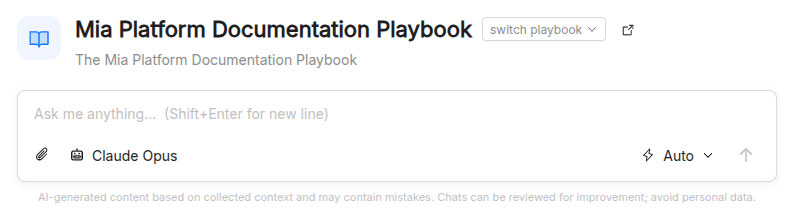
Open Playground from the sidebar and choose your playbook.
-
Click Playbook in the header to open the playbook panel. For each agent you can:
- pick another Model, or keep the agent's default;
- enable or disable individual Skills and Tools, including tools grouped by MCP server.
Changes apply to the next messages of the conversation, and the agents themselves are not modified. The Resources section of the panel lists the playbook skills, prompts, and spec templates.
-
Type
/at the start of the message box to insert one of the playbook's prompts. -
Choose how tool calls are approved with Tool approval: Auto runs every call, Manual asks for your approval on every call, and Read-only asks only for calls that change something.
You can attach files, reopen earlier conversations from History, and download a conversation as PDF or Markdown.
In Mia Flow
With Enable on Mia Flow turned on, the playbook is available in Mia Flow. Launch Mode sets whether it starts in Chat, Code, or Both modes, and Show on Home adds it as a quick-launch button on the Mia Flow home screen.
In your IDE
From the Connections section, subscribe your editor to the AI Foundry plugin marketplace, where each playbook is published as a plugin with its agents, skills, and prompts. For example, the Claude Code page gives you the marketplace URL and the /plugin marketplace add command to register it. Usage of exported plugins appears in AI Foundry observability.
From an agentic workflow
Add a Playbook step to an agentic workflow, select the playbook, and write a templated prompt. The root agent answers by default, or you can pin a specific agent of the flow. Turn on session sharing when later playbook steps must see what earlier ones said. The answer is available to later steps as {{ steps.<id>.output.text }}. See the step reference in Agentic Workflow.
Test and iterate
Test in the Playground
Run the playbook with a small, fixed set of inputs, and reuse it after every change:
- Representative inputs: the requests you expect most often.
- Edge cases: empty or very long input, ambiguous requests, input in another language, requests outside the playbook's scope, and inputs that should trip a guardrail.
For each run, inspect the steps the conversation shows inline: the reasoning of each agent when the model exposes it, each tool call with its input and result (Show raw payload shows the full payload), and the hand-offs between agents. Check that:
- each agent receives what it needs and writes what later agents read;
- model-driven hand-offs pick the right sub-agent;
- loops stop when the work is done, not only when the round limit is reached.
To isolate a problem, disable a tool or skill, or switch one agent to another model, from the Playbook panel.
Verify guardrails
Send inputs that an attached guardrail must block or modify. A blocked request shows a message saying it was blocked by a content policy attached to the agent. Also send similar inputs that must pass, to catch false positives.
Check cost and latency
The token usage indicator in the message box shows Input, Output, and Thinking tokens for the conversation. For aggregate numbers across runs, use the observability pages:
- Platform Sessions: filter by playbook and model, compare response times and token counts, and open a session to read its event timeline, where handoffs and tool calls are tagged by author.
- AI Traces: inspect the tree of model and tool calls of a slow or failing request.
- AI Metrics: compare cost, latency, and token usage by model, playbook, agent, skill, and tool.
- Playbook Insights: in the My playbooks view, choose a playbook to see the signals that crossed a threshold under What to change, with breakdowns by agent, model, skill, and tool.
Iterate on instructions
Change one thing at a time, usually the instructions of a single agent, then rerun the same inputs and compare the results with the previous sessions. Keep the changes that improve the representative inputs without breaking the edge cases.
Checklist
- The flow has exactly one root and the builder shows no remarks.
- Every value read as
{key}is written by an agent that runs earlier through its Output Key. - Every loop has Exit when or instructions that define "done", and a low round limit.
- Representative and edge-case inputs produce the expected answers.
- Hand-offs and tool calls in the Playground match the design.
- Guardrails block or modify what they must, and let valid inputs through.
- Token usage and response time are acceptable in Platform Sessions and AI Metrics.
- Every agent uses the least capable model that passes the tests.
Best practices and troubleshooting
- Prefer controllers for guaranteed order. An agent with several sub-agents lets the model decide; if a step is sometimes skipped, put a Sequential controller in between.
- Keep agents single-parent. An agent that two nodes point at fails to build and disappears from the playbook. Duplicate the agent or put both under one controller.
- Never draw connections back. A cycle cannot be built and its nodes are dropped; use a Loop controller for repetition.
- A loop always runs all its rounds: the exit condition never holds or the agents do not know when to stop. Check that the agent's output key matches the name used in Exit when, and that its answer is exactly the expected value.
- A later agent ignores earlier results: check the Output Key of the producing agent and the
{key}placeholder in the reading agent's instructions. In a Parallel branch, only output keys are shared. - "The agent tried to call a disabled tool": the tool is disabled in the Playground's Playbook panel. Enable it there, or remove it from the agent if it must not be used.
Related resources
- Playbook: spec reference and flow model.
- Agent: instructions, tools, output keys, and model arguments.
- Guardrail: policies attached to agents.
- Agentic workflows: calling playbooks from durable processes.
- AI Sessions and AI Providers: monitoring and debugging.
- Customer Support Playbook tutorial: an end-to-end example.