Tool
A Tool is a catalog resource that describes a discrete, executable capability that an Agent can invoke during a conversation. Tools are how agents extend their abilities beyond pure language generation: they can search the web, read a web page, run code, query systems, or interact with any external service exposed through an MCP server.
A tool has one of two sources:
- Built-in tools belong to an App. They include the tools of the Mia AI Runtime, such as
web_search, and the built-in tools of client applications such as Claude Code, VS Code, and JetBrains. - MCP Server tools are exposed by a registered MCP Server. You rarely create them by hand: from the MCP server's detail page, Discover Tools lists the tools the server exposes and adds the ones you select to the Catalog.
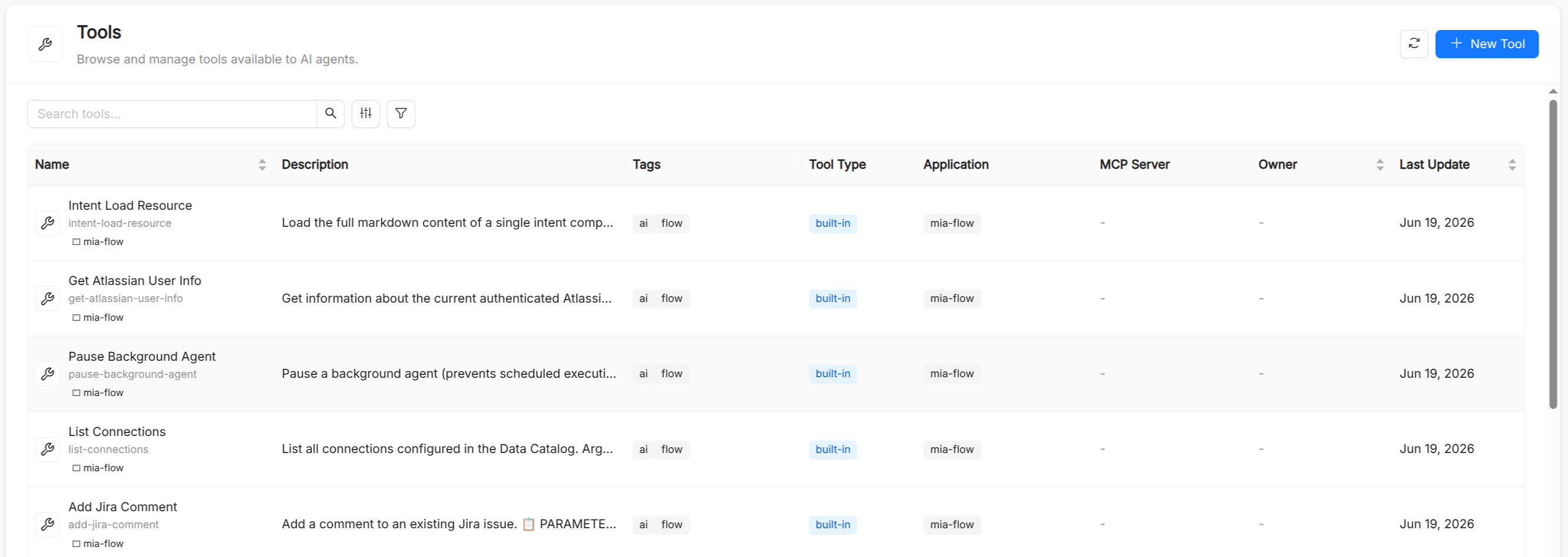
Tool reference
Besides the common metadata (Title, Name, Description, and optional Tags), a tool has the spec fields below. The Name is auto-derived from the title, can contain lowercase letters, digits, dots, and hyphens (starting and ending with a letter or digit, up to 63 characters), and is immutable after creation. Agents reference it in spec.tools.
| Field | Type | Required | Description |
|---|---|---|---|
type | string | Yes | The tool source: built-in or mcp-server. The form shows an additional field depending on the selected type. |
application.name | string | Conditional | Required when type is built-in. The App this tool belongs to, selected in the Application field. |
mcpServer.name | string | Conditional | Required when type is mcp-server. The MCP server that exposes this tool, selected in the MCP Server Name field. |
runtimeName | string | Yes | The identifier the runtime uses to invoke the tool, for example web_search. It must start with a letter, followed by letters, digits, underscores, or hyphens. For MCP tools it is the tool name as exposed by the server. |
category | string | No | A grouping label. Tools with the same category are shown together in the agent's tool picker. |
enabled | boolean | No | When false, the tool is skipped when the agent is built, so it is unavailable at runtime. Defaults to true. |
In the Tools list you can filter by type, application, and MCP server.
Writing good tool descriptions
The tool's description helps the LLM decide when to call it. A clear, accurate description directly improves agent behavior:
- State what the tool does in the first sentence: "Searches the internal knowledge base for articles matching a query."
- Describe the input format: "Input: a natural-language question string."
- Describe the output format: "Output: up to five article snippets with titles and URLs."
- Note limitations: "Only covers articles published after 2023-01-01."
Avoid vague names or descriptions: the LLM uses them to reason about when a tool is appropriate.
Attaching tools to agents
In the agent form, the tool picker lists every registered tool in two sections, Applications' Tools and MCP Server's Tools, grouped by App or MCP server and then by category. You can select tools one by one or a whole group at once.
In the AI Playground you can enable or disable individual tools for a live session without modifying the agent. This is useful for debugging unexpected tool calls.
Mia AI Runtime tools
The internal tools of the runtime, such as web_search, are provided by the Mia AI Runtime App. They are not available to every agent by default: enable them explicitly on each agent that needs them, by selecting them in the agent's tool picker.
Tools added by the platform
Some tools are not catalog items: the runtime attaches them to an agent depending on how it is configured.
- Memory tools: when Memory is enabled for the installation, every agent gets
load_memory,list_memories, andremember, unless its configuration opts it out. - Workspace tools: an agent that runs inside an Agentic Workflow can work in the run's shared workspace.
workspaceToolsgrants the tools that list and read files,workspaceWritesadds the tools that write and edit files, andworkspaceCommandsadds a tool that runs commands. Each setting includes the ones before it, and all of them require a workspace service to be configured.
Tools vs. skills
Both tools and skills extend what an agent can do, but they operate at different levels of abstraction:
| Aspect | Tool | Skill |
|---|---|---|
| Granularity | Fine-grained, single operation | Higher-level, multi-step capability |
| Implementation | AI Foundry runtime or MCP server | Instructions, references, and scripts stored in a Skill |
| Attached to | Agents | Agents and playbooks |
| Invoked by | The model, through function calling | The model, which loads the skill when a request matches it |
See also
- Agent: attaches tools in
spec.tools. - MCP Server: a server that exposes tools through the Model Context Protocol.
- App: the application or plugin that a built-in tool belongs to.
- Skill: higher-level reusable capabilities.
- Guardrail: policies that can run before or during an MCP tool call.