Spec Templates
A Spec Template is a catalog resource that stores a reusable Markdown template driving one step of a Spec-Driven Development workflow: a way of working in which AI agents move through structured phases, from requirement definition and clarification through planning, task breakdown, and implementation.
Each template targets one of two frameworks: Spec Kit (speckit), whose workflow is driven by slash commands, or OpenSpec (openspec), whose workflow is driven by change documents. The template content is what the agent produces or follows when that step is invoked.
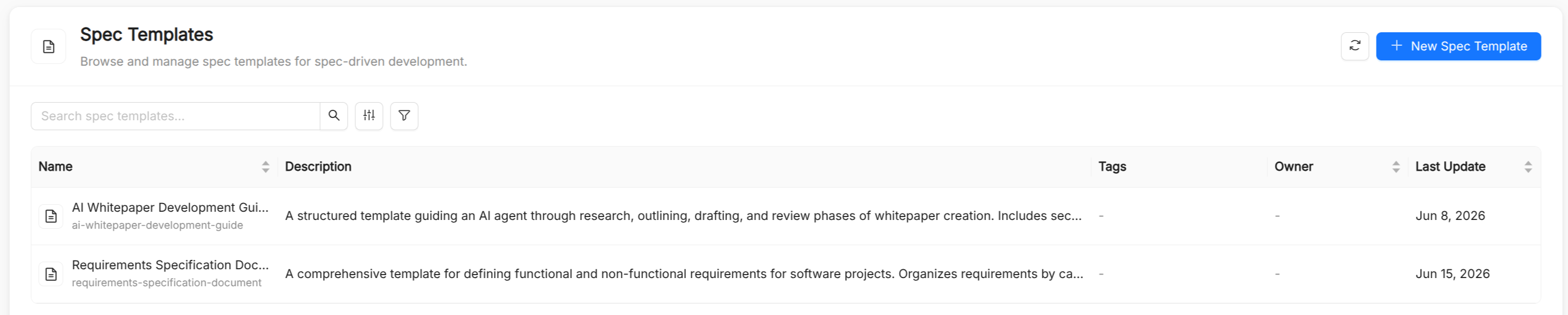
Spec Template reference
Besides the common metadata (title, name, description, and tags), a Spec Template has the following spec fields. The name is referenced in Playbook.spec.spectemplates and Playbook.spec.flow.nodes[].spectemplates.
| Field | Type | Required | Description |
|---|---|---|---|
framework | string | Yes | The Spec-Driven Development framework the template targets: speckit (default) or openspec. |
command | string | Conditional | For speckit only: the slash command that triggers the template. See Spec Kit commands. |
document | string | Conditional | For openspec only: the change document the template drives. See OpenSpec documents. |
template | string (Markdown) | Yes | The Markdown template produced or followed by the command or document. |
In the Create Spec Template form, the Configuration section shows Framework as a toggle; depending on the choice, it then asks for a Command or a Document. The Template editor has Edit and Preview modes, and you can let AI Foundry generate a first draft of the title, description, and template content from a short description.
When to use a Spec Template
Spec Templates are appropriate when you want an agent to follow a consistent structure for:
- Project principles: the coding guidelines and constraints every change must respect.
- Feature specifications: the sections a specification must contain and the level of detail expected.
- Technical plans and task lists: how a plan is broken down into ordered, atomic tasks.
- Change proposals and design notes: the shape of an OpenSpec change and its spec deltas.
- Review checklists: the readiness checks to run before a build or a release.
Spec Kit commands
When framework is speckit, the command field binds the template to one of these phases:
| Command | Purpose |
|---|---|
/spec.constitution | Establish project principles and coding guidelines |
/spec.specify | Write a detailed feature specification |
/spec.clarify | Generate targeted clarifying questions before writing a spec |
/spec.plan | Produce a technical architecture plan from a spec |
/spec.tasks | Break a plan into an ordered, atomic task list |
/spec.analyze | Analyze existing code for patterns and anti-patterns |
/spec.checklist | Run a pre-build readiness check on a spec or plan |
/spec.implement | Implement a specific task from the task list |
/spec.memory | Update the persistent project memory with finalized decisions |
OpenSpec documents
When framework is openspec, the document field binds the template to one document of an OpenSpec change:
| Document | Purpose |
|---|---|
proposal | The change proposal: what changes and why |
tasks | The task breakdown of the change |
design | The design notes of the change |
spec-delta | A spec delta, listing the added, modified, and removed requirements |
Using Spec Templates
- In playbooks: attach templates at the playbook level or to individual nodes, so the agents of a Playbook receive them when the corresponding step runs.
- In your editor: when you download assets from Connections, Spec Kit templates are written under
.specify/templates/and OpenSpec templates underopenspec/templates/, where each framework's tooling picks them up.
Spec Templates vs. Prompts
| Aspect | Spec Template | Prompt |
|---|---|---|
| Purpose | Structure of one Spec-Driven Development step | Instructions, templates, few-shot examples |
| Typical size | Medium to large (full documents) | Short to medium (focused instructions) |
| Bound to | A Spec Kit command or an OpenSpec document | A slash command of its own |
| Rendering | Markdown with edit/preview toggle | Markdown with preview/source toggle |
In practice the two complement each other: a playbook node might receive a Prompt with the task at hand, while a Spec Template defines the structure of the document the node must produce.