Prompt
A Prompt is a catalog resource that stores a reusable piece of text, typically a user message, an instruction template, or a few-shot example set, that Playbooks can reference by name.
Centralizing prompt text in the catalog keeps it searchable, reusable, and decoupled from the resources that consume it. When a prompt needs to change you update it in one place, and every playbook that references it, as well as every IDE it is exported to, picks up the new version.
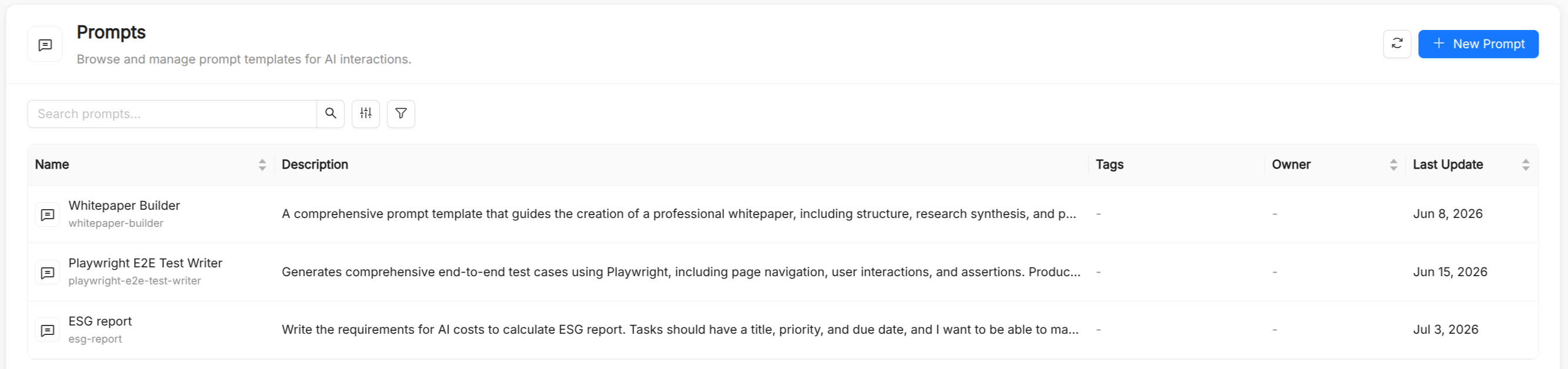
Why centralize prompts?
Prompt engineering is an iterative process. Prompt strings scattered across agent definitions or hard-coded in application code are difficult to audit, compare, or collaborate on. Treating prompts as first-class catalog resources gives you:
- Reuse. Multiple playbooks can reference the same prompt without duplicating text.
- Discoverability. Prompts are listed and searchable in the AI Foundry UI, with full-text and tag-based filtering.
- Separation of concerns. Prompt authors, often domain experts or technical writers, can work independently from the engineers who wire agents together.
- Consistency across tools. The same prompt is offered in the AI Playground and in your IDE as a slash command.
Prompt reference
Besides the common metadata (Title, Name, Description, and optional Tags), a prompt has a single spec field. The Name is auto-derived from the title, can contain lowercase letters, digits, dots, and hyphens (starting and ending with a letter or digit, up to 63 characters), and is immutable after creation. Playbooks reference it in spec.prompts.
| Field | Type | Required | Description |
|---|---|---|---|
prompt | string | Yes | The full prompt text, in Markdown. The form provides a Markdown editor with an Edit/Preview toggle. |
Where prompts are used
- AI Playground. The prompts attached to the selected playbook are offered as slash prompts: type
/at the start of the message box, or use the slash button, and pick a prompt to insert its text into the input. - IDEs and coding assistants. When you download a playbook or a prompt from Connections, or subscribe to the plugin marketplace, prompts are exported in the format each tool expects. For example, they become slash commands in
.claude/commands/<name>.mdfor Claude Code and prompt files in.github/prompts/<name>.prompt.mdfor GitHub Copilot, Cursor, JetBrains, and Antigravity. Amazon Kiro receives them as steering documents with manual inclusion.
When a prompt is exported, its description is added as frontmatter. If the prompt text already starts with a YAML frontmatter block (---), it is exported verbatim, so you can control tool-specific options such as argument-hint directly from the prompt.
Prompt content guidelines
Be explicit about role and constraints. Clearly state what the LLM should and should not do. Vague prompts produce inconsistent outputs.
Use Markdown for structure. Headings, bullet lists, and code blocks inside the prompt text help the LLM distinguish sections of a long instruction.
Document placeholders. If the prompt expects the user to fill in some context (for example, a ticket to triage), say so in the prompt's description so that consumers know what they must provide.
Keep prompts composable. Prefer short, focused prompts that address one concern. A playbook can reference several prompts rather than bundling everything into one.
See also
- Playbook: multi-agent flows that reference prompts in
spec.prompts. - Agent: agents carry their own system instructions, separate from prompts.
- Skill: reusable capabilities that bundle instructions with references, templates, and scripts.
- Spec Templates: longer, structured specification documents referenced by playbooks.