MCP Server
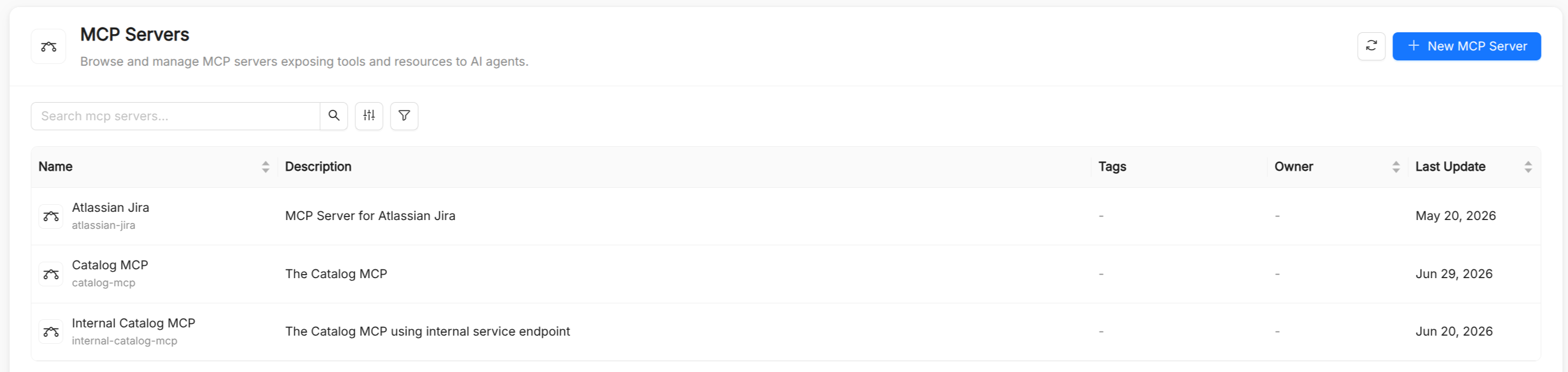
An MCP Server is a catalog resource that registers an external Model Context Protocol (MCP) server with AI Foundry.
Every MCP server you register is stored in two places: the catalog holds its identity (name, description, who can see it, and how agents treat its tools), while the AI Gateway holds how the server is reached and with which credential. Once the server is registered, you can discover the tools it exposes, add them to the catalog, and attach them to Agents like any other Tool.
MCP Server reference
Besides the common metadata (title, name, description, and tags), an MCP Server has the following spec fields.
| Field | Type | Required | Description |
|---|---|---|---|
type | string | Yes | Transport protocol: streamable_http (default), sse, or stdio. Shown as Transport Type in the form. |
url | string (URI) | Conditional | Endpoint URL of the MCP server. Required for streamable_http and sse. |
command | string | Conditional | Executable the gateway runs to talk to the server. Required for stdio. |
args | array of strings | No | Arguments passed to command (stdio only). |
env | object | No | Environment variables set on the process the gateway runs (stdio only). |
tool_name_prefix | string | No | Prefix prepended to every tool name exposed by the server. Letters and underscores only (^[a-zA-Z_]*$). Useful to avoid name collisions across servers. |
tool_filter | array of strings | No | Tools the server may expose. Empty means every tool. Shown as Allowed Tools in the form, and enforced by the gateway as well. |
forward_headers | array of strings | No | Names of request headers (for example, authorization or x-mia-acl-context) relayed from the caller to the server on every tool call. |
timeout | integer | No | Seconds a single call to the server may take before it is abandoned. |
use_mcp_resources | boolean | No | Whether to expose MCP resources in addition to tools. Defaults to false. |
require_confirmation | boolean | No | Whether each tool invocation requires explicit user confirmation before it runs. Defaults to false. |
routing | string | No | How agents reach the server: gateway (through the AI Gateway) or direct. Servers saved from the AI Foundry form always use gateway. |
gateway | object | No | Set by the platform: the gateway identifier and server name, the authentication type, the allowed tools and, for OAuth servers, the OAuth endpoints, client ID, scopes, and flow. Read-only. |
The name of an MCP server can contain only lowercase letters, digits, and hyphens, and cannot be changed after creation. Because the gateway prefixes every tool name with a name derived from it, the server name is limited to 23 characters.
Secrets never reach the catalog. Tokens, passwords, API keys, and OAuth client secrets are sent to the AI Gateway, stored encrypted, and never shown again. Static headers that look like credentials are refused: use the authentication settings instead.
Registering an MCP server
The Create MCP Server wizard has three steps. You can create the server from the second step onward, because the third step holds only optional settings.
- Overview: title, name (auto-derived from the title), description, and tags.
- Connection: transport type, URL (or command, arguments, and environment variables for
stdio), and authentication. Test connection asks the gateway to reach the server with the values entered so far, before anything is saved. - Advanced: OAuth client and endpoint overrides, forward headers, static headers, tool name prefix, allowed tools, timeout, Expose MCP Resources, and Require Confirmation.
The Connection and Advanced steps also offer a JSON view, so you can paste their configuration in one go.
Authentication
The Authentication field configures how the gateway authenticates to the MCP server.
| Authentication | Credential | Description |
|---|---|---|
None | - | No authentication. |
Bearer token | Bearer token | Sent as Authorization: Bearer <token>. |
Basic (username:password) | Credentials | HTTP Basic authentication, entered as username:password. |
API Key (custom header) | API key, optional header name | Sent in a custom header. The header defaults to X-API-Key when left blank. |
OAuth2 (access token) | See OAuth servers | OAuth 2 with either the authorization code flow or the client credentials flow. |
When you edit a server, the credential field is empty: leave it empty to keep the stored credential, or type a new one to replace it.
OAuth servers
For an OAuth server you choose the OAuth flow:
- Authorization code: each person connects their own account once, and the gateway holds a token for that person only. Use it for servers that expose per-user data.
- Client credentials: one shared machine token for everyone. The Client Secret is required.
Discover OAuth reads the metadata the server publishes about its own authorization endpoints. The Authorization URL, Token URL, and Registration URL fields in the Advanced step are overrides: leave them empty unless the provider publishes no metadata, because the gateway discovers them on its own. When the provider supports dynamic client registration, the gateway registers itself and no Client ID is needed; otherwise, enter the client ID and secret of an application created in the provider's console, and the Scopes to request.
Set Issuer and Resource when the server is behind the same login as AI Foundry: people who are already signed in then skip the connection step, because their token is exchanged on each request.
Connecting your account
When a server uses the authorization code flow, its tools fail for you until you connect your own account. The server detail page shows a Connect account button, which sends you to the provider to give consent and then brings you back to AI Foundry.
Once connected, the button becomes Account connected, with Reconnect and Disconnect options. Disconnecting removes the token the gateway holds for you, so the server's tools stop working for you and only for you. Connecting your own account does not require administrative permissions.
How MCP tools appear in AI Foundry
Adding an MCP server's tools to the catalog is a guided flow started from Discover Tools on the server detail page:
- Discovery: the gateway lists the tools the server currently exposes. For a per-user OAuth server, the list reflects what your own account can reach, so connect your account first.
- Selection: you choose which of the discovered tools to add.
- Conflict check: if any selected tool already exists in the catalog, AI Foundry lists the conflicts and asks you to confirm with Add Anyway, which overwrites their current configuration.
- Registration: AI Foundry creates or updates a catalog
Toolitem for each selected tool and links it to the MCP server. Iftool_name_prefixis set, each tool's name becomes{prefix}_{tool_name}.
Once registered, these tools behave like any other Tool resource: they are selectable in the agent creation form's tool picker, and at runtime AI Foundry routes calls to them through the AI Gateway to the MCP server.
Prompts and resources
Besides tools, an MCP server can expose prompts and resources. AI Foundry makes them available to agents together with the server's tools. To expose resources, turn on Expose MCP Resources in the Advanced step.